Getting started
Requirements
Julia ≥ 1.9 (the
[compat]block inProject.toml). The code is developed and tested on Julia 1.10.All dependencies are registered packages pinned by the shipped
Manifest.toml: MUMPS.jl and MPI.jl (direct Stokes solver and the 3-D MPI path), WriteVTK (ParaView output), JLD2 (checkpoints), Krylov, IterativeSolvers and AlgebraicMultigrid (iterative solvers), Plots/GR (diagnostic figures).MPI is initialised in every process.
solvers/solve_stokes_mumps.jlcallsMPI.Init()when the file is included, because MUMPS needs a communicator. A serial run is a single-rank MPI singleton; nompiexecis needed. MPI.jl uses its bundled MPI binary unless you configure a system MPI.Threads. The marker scatter, the 3-D SCGS smoother and several marker loops use Julia threads. Set
JULIA_NUM_THREADS(orjulia -t N). On a shared machine, pin it to what you can spare.
Installation
The source code is available from the author on request until it is released with a citable publication. In your copy of the repository, install the dependencies:
cd MILEVA
julia --project=. -e 'using Pkg; Pkg.instantiate()'
There is no package to build and no using MILEVA. MILEVA is a flat-include code: include/mileva.jl includes every source file in dependency order into Main, and main_SphCon.jl defines the time loop main_SphCon. See Architecture for the include graph.
visualization/plot_panels.jl uses a Plots macro (@layout) at definition time, so a script of your own loads Plots before include("include/mileva.jl"), as the one below does (run_mileva.jl does this itself).
Running the tests
JULIA_NUM_THREADS=4 julia --project=. --heap-size-hint=3G tests/run_tests.jlThe suite takes four to five minutes with 4 threads and stays under 4 GB. It checks invariants (work equals dissipation, Nu = 1 on a conducting state, exact energy closure of a marker step, quiescence of an unforced model) rather than reference numbers. What it covers, and what it does not, is set out in Testing.
A first 2-D run
A run is a Julia script that loads MILEVA, edits the three configuration structs and calls main_SphCon:
| Struct | File | Holds |
|---|---|---|
cfg::SimConfig | config/SimConfig.jl | geometry, grid, solver, physics switches, time stepping, output |
mat::MaterialProperties | config/MaterialProperties.jl | layer radii, per-layer viscosity prefactors, creep and yield parameters |
temp::TemperatureConditions | config/TemperatureConditions.jl | boundary temperatures, initial profile, radiogenic heating layout |
All three are @kwdef mutable structs, so SimConfig(Nr = 64) and cfg.Nr = 64 are equivalent. main_SphCon calls validate! on each before it starts (validate!(cfg) refuses, for example, the ambiguous geometry = "annulus").
The example below is an isoviscous, basally heated spherical annulus at Ra = 10⁴ in the Hernlund and Tackley (2008) shell,
is reached by solving for the viscosity, benchmarks/hernlund_tackley_annulus.jl. Save it as first_run.jl in the repository root:
# first_run.jl  -  isoviscous, basally heated spherical annulus at Ra = 1e4
using Plots; gr()                       # needed before include/mileva.jl
include("include/mileva.jl")
include("main_SphCon.jl")

cfg = SimConfig();  mat = MaterialProperties();  temp = TemperatureConditions()

cfg.dim      = 2
cfg.geometry = "spherical_annulus"      # r^2 dr measure
cfg.R_in     = 1.22e6                   # f = R_in/R_out = 0.5495
cfg.R_out    = 2.22e6                   # 1000 km thick layer
cfg.Nr       = 64
cfg.Nt       = 512
mat.R_cmb = cfg.R_in;  mat.R_surf = cfg.R_out
mat.R_Dprime = cfg.R_in + 0.05e6;  mat.R_lower = cfg.R_in + 0.30e6
mat.R_trans  = cfg.R_in + 0.55e6;  mat.R_upper = cfg.R_in + 0.70e6
mat.R_asth   = cfg.R_in + 0.90e6

# Ra = rho0 g alpha dT D^3 / (kappa eta)  ->  eta
cfg.g = 9.81;  cfg.rho0 = 3300.0;  cfg.alpha = 3e-5;  cfg.kappa = 1e-6
Ra  = 1.0e4
eta = cfg.rho0 * cfg.g * cfg.alpha * 1000.0 * (cfg.R_out - cfg.R_in)^3 / (Ra * cfg.kappa)
cfg.eta_min = eta;  cfg.eta_max = eta
mat.E_act_scale = 0.0
for f in (:Dprime_eta0, :lower_eta0, :trans_eta0, :upper_eta0, :asth_eta0, :lith_eta0)
    setproperty!(mat, f, eta)
end
mat.useContinents = false

# Boussinesq, nothing optional switched on
for f in (:useCompressibility, :useCompositeRheology, :useAntisqueeze, :evolveGrainSize,
          :useMeltingPhase, :useClaperonBuoyancy, :trackBasalt, :useThermochemicalPiles,
          :useRadiogenicHeating, :useHeatPipe, :useMagmaOceanFreezing, :useFrankKamenetskii)
    hasproperty(cfg, f) && setproperty!(cfg, f, false)
end
cfg.compressibilityMode = "Boussinesq"
cfg.cmbHeatfluxMode     = "fixed_T"
temp.T_cmb = 1300.0;  temp.T_surf = 300.0;  temp.cmb_cooling = false
temp.initial_profile = "adiabatic"      # with zero TBL thickness: a linear ramp
temp.tbl_bottom_thickness = 0.0;  temp.tbl_top_thickness = 0.0
cfg.T_potential_ref = 800.0;  cfg.adiabat_gradient = 0.0
cfg.alpha_surf_ref = 3e-5;  cfg.alpha_cmb_ref = 3e-5
cfg.m_wavenumber = 6;  cfg.dT_anomaly = 20.0;  cfg.rng_seed = 42

cfg.solverType     = "mumps"            # 2-D production solver
cfg.picardMax      = 1                  # viscosity does not depend on strain rate
cfg.maxSteps       = 300
cfg.logEvery       = 50
cfg.saveVTK        = true;   cfg.vtkEvery = 100
cfg.saveCheckpoint = true;   cfg.checkpointEvery = 100
cfg.outputDir      = "output/first_run"

history = main_SphCon(cfg, mat, temp)
Run it:
JULIA_NUM_THREADS=4 julia --project=. first_run.jlMeasured on the development machine (4 threads): about one minute of loading and compilation, then 0.23 s per step, of which 0.13 s is the MUMPS Stokes solve, so the whole script finishes in under two minutes.
The time step is capped by cfg.dtMax (default 2e13 s), so 300 steps reach 190 Myr. The thermal diffusion time of a 1000 km layer is m_wavenumber = 6 perturbation (V_rms is of order 1e-3 cm/yr at step 300). To reach the statistically steady state and compare against the published spherical-annulus values, use the benchmark driver, which runs to 0.6 diffusion times and checks its own convergence: julia –project=. benchmarks/hernlund_tackley_annulus.jl HT4 64.
first_run.jl keeps the viscosity constant so that it finishes in two minutes. What MILEVA is built for is a viscosity that depends on temperature. With an Arrhenius law the cold top boundary layer becomes thousands of times stiffer than the interior and stops taking part in the flow, until its stresses reach the yield stress and it breaks:
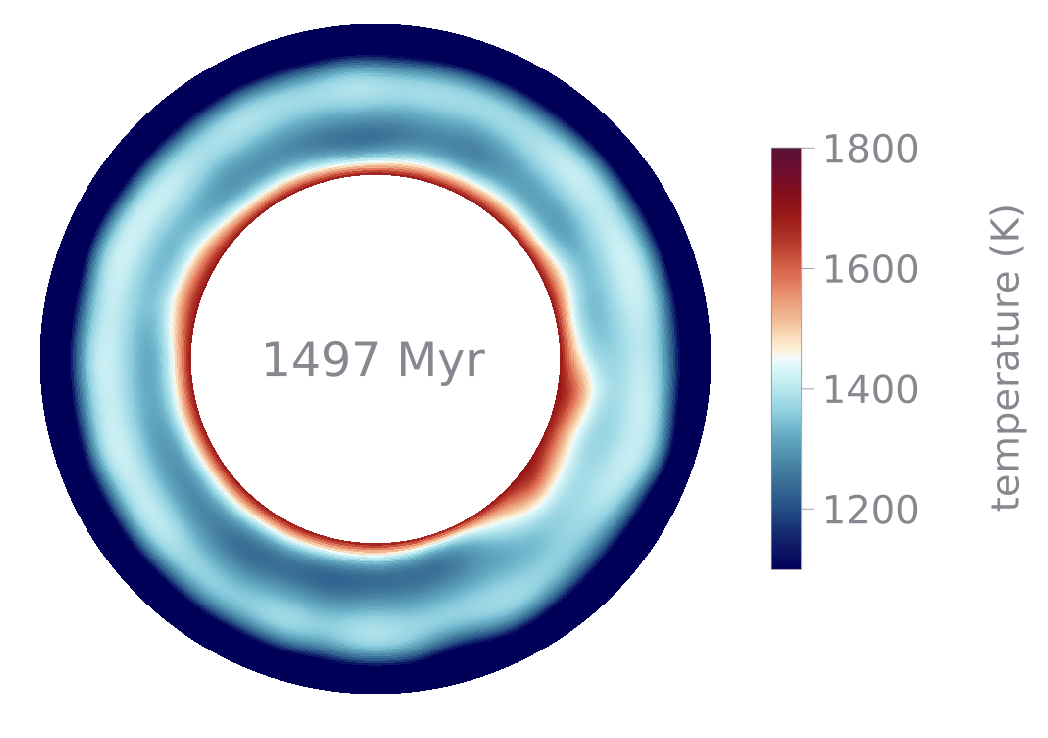
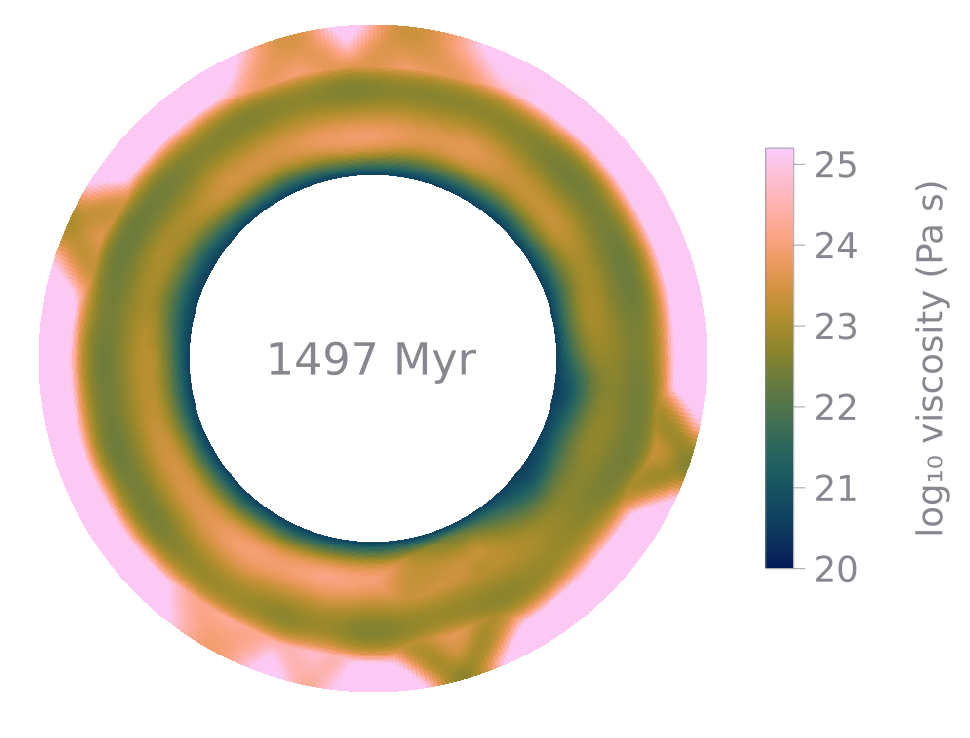
The stagnant-lid example after 1497 Myr: the same spherical annulus with an Arrhenius viscosity, an interior Rayleigh number of 10⁶, a viscosity contrast of 10⁴, a yield stress of 8 MPa and uniform internal heating (Nr = 64). The lid has failed and sunk twice and is regrowing over an interior cooled by the sunken lid. Left, temperature; right, log₁₀ viscosity. The lid sits at the viscosity ceiling except in a few wedges where its stress has reached the yield stress and the viscosity drops by up to a hundredfold, the places where it will break next. Rendered with docs/scripts/render_annulus_gif.jl.
What the log line means
Every cfg.logEvery steps main_SphCon writes one line to the terminal and to logs/simulation_log.txt:
Step   | Time(Myr)  | Vrms(cm/yr)  | Nu_top  | Nu_bot  | dt(s)    | T_cmb(K) Vsurf(cm/yr) mobility <T>(K) melt_cum(km) [crust(km)] (wall s)
  300 |   190.1285 |         0.00 |   1.678 |   0.612 | 2.00e+13 | Tcmb=1300 Vsurf=0.00 mob=0.775 <T>=700 melt=0.0km ωR=0.00 lidrot=-0.00cm/yr bud=+0.000  (0.2s)
Nu_top and Nu_bot are the conductive wall fluxes divided by the conductive-shell flux of the same geometry (compute_diagnostics in utils/compute_diagnostics.jl); they differ here because the run is far from steady state, and they must agree once it is. ωR is the solid-body rotation removed by cfg.removeNetRotation (2-D only). bud= is the energy-budget residual of the last diagnostics row (see below); a conservative run reads close to zero. Lines starting with [buoy parts], [peak V] and [H terms] break down the buoyancy, the velocity peak and the volumetric heat sources.
Output layout
Everything lands under cfg.outputDir. The tree below is the directory a smoke test of first_run.jl wrote (16 × 128 cells, 4000 steps, cfg.outputDir = "output/docs_short/smoke", a VTK frame and a checkpoint every 2000 steps):

The output of one run. VTK file names carry the step and the model time in Myr, and vtk/simulation.pvd is the file to open in ParaView.
| File | Written by | When |
|---|---|---|
logs/simulation_log.txt | _log closure in main_SphCon.jl | every cfg.logEvery steps, plus the first steps |
diagnostics.csv | open_diagnostics_csv, write_diagnostics_row! (utils/diagnostics_csv.jl) | step 1, every cfg.diagEvery steps (0 means cfg.logEvery) and the last step; cfg.diagCSV = false turns it off |
vtk/step_<step>_<time>Myr.vts | save_vtu (utils/save_vtu.jl) | step 1 and every cfg.vtkEvery steps when cfg.saveVTK |
vtk/simulation.pvd | write_pvd_file (utils/write_pvd_file.jl) | rewritten after each frame |
checkpoints/checkpoint_step<NNNNN>.jld2 | save_checkpoint (utils/save_checkpoint.jl) | every cfg.checkpointEvery steps when cfg.saveCheckpoint |
figures/step_<step>.png, figures/history.png | plot_panels (visualization/plot_panels.jl) | every cfg.framesEvery steps when cfg.saveFigures, 2-D only |
Bulk output elsewhere. VTK frames and checkpoints are the large files. Set cfg.bigOutputDir (or the environment variable MILEVA_BIGOUT) to send them to another volume; the run directory then holds vtk and checkpoints symlinks into it, so every path above still works (big_output_dir in utils/geometry.jl). If that location is unreachable the run warns once and writes locally. Empty, the default, means everything goes to cfg.outputDir.
diagnostics.csv
The column order is fixed by DIAG_CSV_COLUMNS in utils/diagnostics_csv.jl, and post-processing should key on the header names. The most used columns:
| Column | Definition |
|---|---|
step, t_Myr, dt_s | step index, model time (Myr), time step (s) |
Vrms_cmyr | volume-weighted rms velocity in the run's own measure ( |
Vsurf_rms_cmyr | rms of the top-row velocity, in the no-net-lithospheric-rotation frame |
lid_mobility | Vsurf_rms / Vrms |
lid_thick_km | depth of the interpolated 1300 K crossing of the horizontally averaged temperature; NaN when there is no lid |
T_mean_K, T_cmb_K | weighted mean temperature; current CMB temperature (evolves when cfg.cmbHeatfluxMode = "parameterized") |
q_cmb_mWm2, q_surf_mWm2 | mean conductive wall heat flux, evaluated at the wall face |
Nu_top, Nu_bot | as in the log |
picard_n, picard_rel | nonlinear sweeps this step and the final relative change in V_max; a row at the sweep cap with picard_rel > cfg.picardTol is not a converged solution |
E_th_J, dEdt_W, P_supplied_W, budget_resid | thermal energy, its rate of change, the power supplied by walls and internal sources since the previous row, and the normalised residual between them |
limiter_hits | steps with V_max above cfg.Vmax_limit (a warning counter; the limiter itself is off by default) |
The melt-ledger, inventory and crust columns (melt_prod_cum_km, basalt_inv_km, crust_geol_km, ...) are zero or NaN unless cfg.trackBasalt is on. The ledger (*_cum_km) and the inventories (basalt_inv_km, depletion_inv_km) are MASS expressed as a layer thickness at cfg.rho0: each marker counts with marker_mass_measure, its weight M.w times M.w under Boussinesq). Under ALA/TALA M.w is a volume that shrinks as material sinks, so a volume inventory would drift while the mass is conserved; with this measure basalt_inv_km minus its initial value equals erupted plus intruded plus freezing minus backlog, and depletion_inv_km equals melt_prod_cum_km, in every compressibility mode. NaN is written literally whenever a quantity is undefined and is never replaced by zero.
budget_resid is the quantity to watch. The main loop accumulates the wall power every step with the diffusion solver's own time weighting (boundary_power in utils/diagnostics_csv.jl), so it tests conservation, not sampling. The example above reads 0.000 throughout.
Viewing results in ParaView
Open output/<run>/vtk/simulation.pvd; it drives the animation slider, with timesteps in Myr of model time.
2-D frames are curvilinear structured grids (
.vts) in theplane, with Cartesian node coordinates , in metres. Each scalar is written twice: as point data (bilinear cell-to-node average, smooth shading) and as cell data (the exact cell values). Select the cell array when you need what the solver actually computed. 3-D frames are a
.vtmwrapping one.vtsthat covers the whole sphere.save_vtu(::String, ::MutableGrid3D, ...)resamples Yin and Yang onto one latitude-longitude lattice and blends them across the overlap (_patch_blend), so the seam is rendered from both patches' own data.
Field names carry their units. In 2-D: Temperature [K], T_dev [K] (lateral anomaly, or the departure from the adiabat under ALA), Velocity [m/s] (Cartesian vector, from the staggered components), Pressure [Pa], Viscosity [Pa.s], log10Viscosity [log10Pa.s], StrainRate_II [1/s] and the rr, tt, rt components, Stress_II [Pa] and components, ViscDissipation [W/m3], Buoyancy [N/m3], GrainSize [m], Composition [-], and, when the corresponding physics is on, Basalt [-], Depletion [-], TCpile [-], T_adiabat [K]. In 3-D the strain-rate and stress components are rr, thth, phph, rth, rph, thph.
Useful defaults: colour by T_dev [K] to see plumes and slabs against the mean profile, and by log10Viscosity [log10Pa.s] for the lid. For velocity arrows apply a Glyph filter on Velocity [m/s].
Checkpoint and restart
cfg.saveCheckpoint  = true
cfg.checkpointEvery = 2000      # steps
save_checkpoint writes a JLD2 file holding the grid (including the current T_cmb), the full marker set, cfg, mat, the step, time and dt, and the fields the loop needs to continue: temperature, viscosity, velocity, pressure, strain rate, grain size, damage, the history arrays, the basalt and depletion grids, the melt ledger and the per-column melt backlog.
To resume, point cfg.resumeFrom at a checkpoint and raise cfg.maxSteps, which is the last step number, not a count of further steps:
cfg.resumeFrom = "output/first_run/checkpoints/checkpoint_step00300.jld2"
cfg.maxSteps   = 400            # continue from 301 to 400
Everything else in the script stays the same. On resume main_SphCon (main_SphCon.jl, "Resume from checkpoint"):
refuses a checkpoint of the other dimension, and one written under a different
cfg.geometry, because the radial measure changes the marker weights and every weighted integral;appends to
logs/simulation_log.txtwith a===== resumed from ... =====marker instead of overwriting it;recovers the VTK frames already on disk into
simulation.pvd, ordered by the model time parsed from the file name;drops CSV rows at or after the restart step and continues the file.
In 2-D, 300 steps plus a resumed 300 reproduce a continuous 600-step run to 1e-11 to 1e-9 relative, with marker weights and the melt backlog identical. In 3-D the tangential velocities are rebuilt by the first Stokes solve after a resume.
A 3-D run
The same loop runs the Yin-Yang shell when cfg.dim = 3. The grid is built by _setup_grid_3d (utils/setup_grid.jl): cfg.Nt sets the colatitude count Nth of each patch and the longitude count is derived as Nph = 3 Nth (rounded to a multiple of 3), so each patch has Nr × Nth × 3Nth cells and the shell has twice that. See Yin-Yang grid. The snippet below is sized for a smoke test; for a production set-up see examples/yinyang_convection_3d.jl and 3-D plumes.
cfg.dim        = 3
cfg.Nr         = 32                 # smoke-test size only; science runs start at Nr = 64
cfg.Nt         = 32                 # Nth = 32, Nph = 96 per patch
cfg.solverType = "multigrid"
cfg.mgLevels   = 3                  # must be >= 2 in 3-D
3-D uses multigrid
Set cfg.solverType = "multigrid" and cfg.mgLevels ≥ 2, and choose Nr and Nt divisible by mgLevels = 1 the 3-D solver falls back to a direct LU of the whole patch, whose memory grows quickly (more than 12 GB at about 170k unknowns).
Other 3-D differences: cfg.removeNetRotation has no effect (validate! warns), the panel figures are 2-D only, and the Yang patch's temperature is a grid field advected by advect_temperature_3d_upwind! and coupled to Yin by a Schwarz iteration on the patch walls (cfg.nTSchwarz rounds).
MPI launch (3-D)
main_SphCon is the serial loop and contains no MPI code; with cfg.useMPI = true it stops with an error that names the MPI driver. The MPI path is bin/run_mpi.jl, a separate driver with its own time loop:
julia --project=. -e 'using MPI; run(`$(mpiexec()) -n 2 $(Base.julia_cmd()) --project=. bin/run_mpi.jl my_3d_params.jl 50 5`)'The arguments after the parameter file are the number of steps (default 50) and the output interval (default 5). The parameter file must itself construct cfg (and optionally mat, temp), since the driver does not.
bin/run_mpi.jl runs at 2 ranks, one per Yin-Yang patch. It sets its own initial condition (the conductive profile plus a Gaussian plume bump) and a fixed viscosity of 1e22 Pa s, and solves Stokes through solve_stokes_distributed! (solvers/solve_stokes_distributed.jl); it demonstrates the distributed solver stack. For 3-D convection use examples/yinyang_convection_3d.jl. Output is per-rank VTS plus a master VTM and a PVD.
bin/mileva run-mpi -n 2 <script> launches mpirun -n 2 julia --project=. <script>. It needs mpirun on the PATH and passes only the script, so it suits the self-contained MPI tests (for example tests/test_mpi_2rank_smoke.jl) but not bin/run_mpi.jl, which also needs its parameter file; use the mpiexec() form above for that. The MPI tests are not part of tests/run_tests.jl.
The bin/mileva launcher
| Command | Does |
|---|---|
bin/mileva run <script.jl> | cd to the repository root and julia --project=. <script.jl>, with JULIA_NUM_THREADS defaulting to the number of cores. The script must be self-contained like first_run.jl above; run it from the repository root, or give an absolute path (the script must exist relative to the caller's directory before bin/mileva changes to the root). |
bin/mileva run-mpi -n N <script.jl> | mpirun -n N julia --project=. <script.jl> (see above) |
bin/mileva test [name] | runs tests/<name>.jl; without a name, tests/smoke_stokes_3d_mg.jl |
bin/mileva docs | builds this site from docs/make.jl |
On a shared machine set JULIA_NUM_THREADS explicitly before bin/mileva run, because its default takes every core.
Where to go next
Governing equations: the equations the loop solves and in which geometry
Discretization: the staggered finite-volume grid and the radial measure
Rheology: viscosity laws and their switches
Architecture: the include graph, the data structures and the time loop step by step